
Oh yaa.. bought 2.5 HD enclosure.. unfortunately it didn't F$%#ing fit .Im a bit frustrated that day.. i didn't know that.. this HD doesn't fit in the casing.Id expect all the 2.5 HD comes in standard size.But then.. this 2.5 Toshiba HD which comes with the Laptop is a little bit old.. therefore.. the hardisk also a little f#$king big.So i just leave it naked without the case and used the leather pouch that comes together with the HDD case to cover the HD. felt sooo rugi.. adoii.But overall.. the cable was functioning well.
After finish my last test, i start configuring back my Pentium 200mhz Scsi HD(sakura).Which having problem with the new kernel that i've compiled.Damn.. it took so long to compile on this machine.After so many times of compiling this kernel.. ive come to understand that im the one who is acting like a fool.Ive been compiling the kernel with the wrong processor type.I was thinking this box is my AMD Athlon XP duhhhhh!!.. but then it just a pentium MMX box.Adooiiiii when ive just realised it.., i feel like i wanna bang my head to the wall.. stupid stupid.
So start recompiling the kernel back but this time with the correct processor type duhhhh!!
rezdrake@sakura:~$ cd /usr/src/linux
rezdrake@sakura:/usr/src/linux$ make menuconfig
set the processor type,remove unwanted modules(irda,USB support,bla bla),set 3com Network drivers 3c509.o to be builtin in the kernel
rezdrake@sakura:/usr/src/linux$ make dep
rezdrake@sakura:/usr/src/linux$ make clean
rezdrake@sakura:/usr/src/linux$ make bzImage
rezdrake@sakura:/usr/src/linux$ make modules
rezdrake@sakura:/usr/src/linux$ make modules_install
Move the compiled kernel to /boot
rezdrake@sakura:/usr/src/linux$ mv /arch/i386/boot/bzImage /boot
Copy the new System.map file to /boot
rezdrake@sakura:/usr/src/linux$ ls
COPYING Makefile System.map fs/ kernel/ scripts/
CREDITS README arch/ include/ lib/ vmlinux*
Documentation/ REPORTING-BUGS crypto/ init/ mm/
MAINTAINERS Rules.make drivers/ ipc/ net/
rezdrake@sakura:/usr/src/linux$ cp System.map /boot
Then enter /boot
rezdrake@sakura:/usr/src/linux$ cd /boot
Rename bzImage kernel to filename such as vmlinuz-2.4.22
rezdrake@sakura:/boot$mv bzImage vmlinuz-2.4.22
Edit lilo.conf to add a new kernel into the lilo menu.
root@sakura:/boot# pico /etc/lilo.conf
# Linux bootable partition config begins
image = /boot/vmlinuz-2.4.22 <--- add the new kernel root = /dev/sda2 label = Slackware-9.1 read-only # Non-UMSDOS filesystems should be mounted read-only for checking image = /boot/vmlinuz root = /dev/sda2 label = Slackware-old # Linux bootable partition config ends --------------------------------------------------------------------------------
Play with linux_logo this morning . So i installed this on Sakura. Quick and Dirty Installing linux_logo untar and uncompress the file tar -xzvf linux_logo-4.08.tar.gz enter the directory cd linux_logo-4.08 edit the Makefile and be sure everything is set up the way you want. [on stock Linux systems it should work without any changes] compile the program make install (you'll probably want to do this as root) with make install I prefer the classic logo. so i'd set it so that the logo will display at the login screen
So... as root
root@sakura:/boot# pico /etc/rc.d/rc.M
I add this
/usr/local/bin/linux_logo -f -c -d -F"Slackware Linux 9.1 (Sakura)\nKernel Version Edisi Kambing Gurun\n#X #T #M #R\n#U\n#B Bogomips Total" > /etc/issue
/usr/local/bin/linux_logo -f -c -d -F"Slackware Linux 9.1 (Sakura)\nKernel Version Edisi Kambing Gurun\n#X #T #M #R\n#U\n#B Bogomips Total" > /etc/issue.net
/usr/local/bin/linux_logo -f -c -d -F"Slackware Linux 9.1 (Sakura)\nKernel Version Edisi Kambing Gurun\n#X #T #M #R\n#U\n#B Bogomips Total" > /etc/motd
So the result will look like this
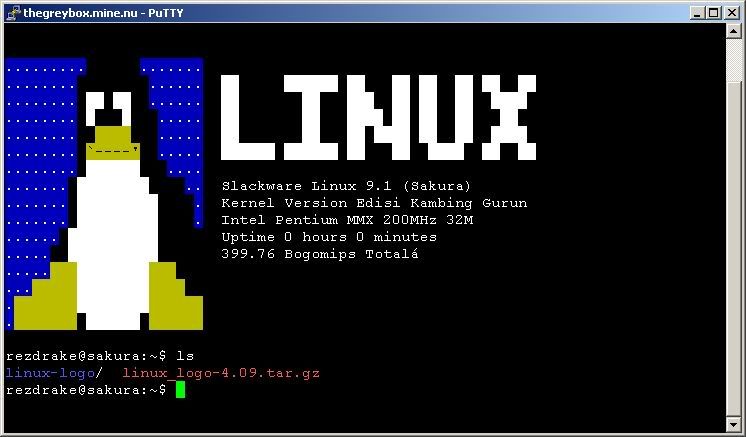
thats all for now.. probably later will be experimenting with apache,php and setup and configuring squirrelmail.
not feeling well to day.. had flu not that bird flu.. need to get rest.. choww..


0 comments:
Post a Comment