Monday, December 25, 2006


Entry for December 25, 2006


Hmm lama aku menyepi.. bz with work,life.Hari ni boring... wan lak ajak aku gi wifing.buhsan punya pasal... aku test wifi dgn azwan dekat KLIA.skang dah pukul 4.06.still doesnt feel sleepy.Siang tadi aku pergi kenduri kawin member gurl aku at shah alam.skali aku tak bajet plak pengantin pompuan bau bau kentut or bau bau machang dgn family belah mak aku.skali sedara mara plak.then aku kena tahan dgn tok su aku kat shah alam since memang kenduri tu area dekat dgn umah tok su aku.. aku bajet nak jumpa ajon skali kena panggil dgn toksu diajak nya aku masuk skali sampai laa kul 11 lebih aku kat sana.. tadi depa buat BBQ.aku pun tolong laa serba sedikit.kenyang gak aku tadi.Alhamdulillah rezeki aku syukur.... hmm apa laa aku nak tulis lagi.. no mood too blog.. maybe later will continue blogging.. bye for now.


Wednesday, November 08, 2006

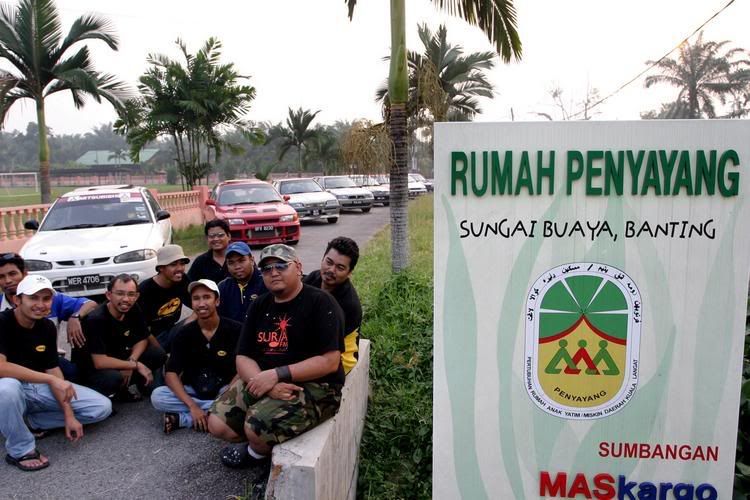
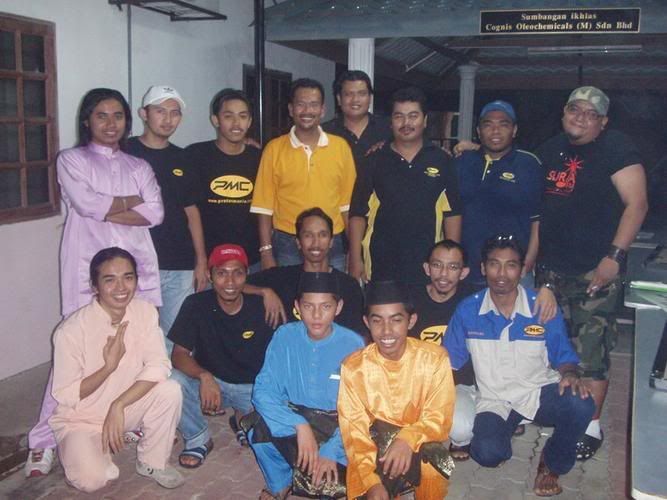
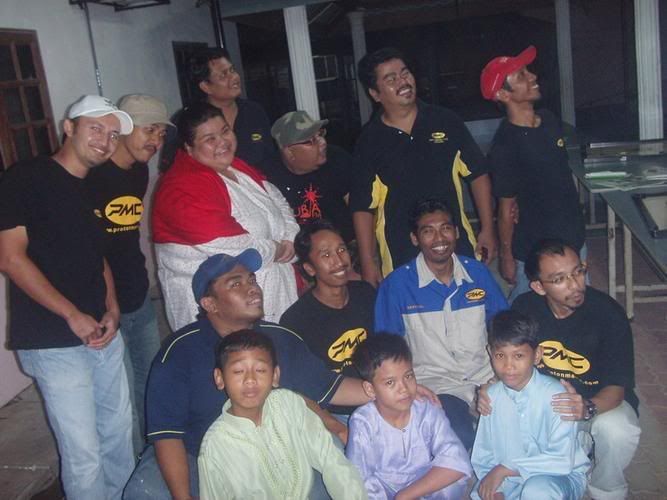
Kerja amal - PMC,Suria FM,Selangor FC,Artis


Alhamdulillah di dalam bulan Ramadan yang mulia ini.. aku berpeluang untuk menyertai kerja amal di Rumah anak2 yatim bertempat di Pertubuhan anak anak Yatim Miskin Kuala Langar, Kg Sungai Buaya Banting, Selangor.Aku dan sahabatku mewakili projek kerja amal ini bersama dengan ahli2 Suria FM, Selangor FC dan juga artis.First time laa aku dapat berbuka puasa dengan anak2 yatim.Seronok juga dapat berbuka dengan mereka..bila mengenangkan mereka tidak ada tempat untuk menumpang kasih.Aku berasa syukur kerana aku masih lagi mempunyai ibu dan ayah.Bila aku berada dekat dengan mereka.. aku usap kepala mereka.. aku penah dengar Ustaz penah bercakap.. bila kita usap kepala anak2 yatim, seluruh dosa2 kecil kita dihapuskan.Tidak dapat aku membayangkan saat2 bila mereka memerlukan kasih sayang ibu ayah.Apatah lagi menjelang hari raya tidak lama lagi.

Hari itu aku membantu mengecat asrama mereka,dewan2, bergotong royong membersihkan kawasan asrama and pada masa yang sama.. bergaul mesra dgn mereka.Memang boleh terasa betul2 penat hari tu.. bermakna sungguh berbuka dengan cuma air kosong.. tuhan saja yang tahu.. betapa nikmatnya air kosong waktu berbuka :).Artis pun turun utk menjayakan majlis berbuka and bergotong royong.Antara artis and club lain yang hadir ari tu, Shanie,Mix apa ntah,zaibo,Hamid Gurkha,Nash,Kristal,Ahmad Busu,Betty Banafe,Aziz satar,yazer,bob,Sarimah and club selangor FC ,Suria FM and of course.. our club PMC

Sunday, July 02, 2006

Command to list all the installed packages on Unix systems

1. Linux
rpm -qa

2. HP-UX
swlist

3. Solaris
pkginfo

4. Tru64
setld -i

5. AIX
lslpp -l

Saturday, June 24, 2006

AIX

Teknik bayangan padu maut

---------

mklv -y (lv) -c(copies 2 or 3) (vg) (No of PP's) (PV Name optional)

Creates a mirrored named logical volume.

mklvcopy -s n (lv) (copies 2 or 3) (pv)

Creates a copy of a logical volume onto another physical volume. The physical

volume MUST be in the same volume group as the orginal logical volume !

rmlvcopy (lv) (copies 1 or 2) Removes logical volume copies.

rmlvcopy (lv) (copies 1 or 2) (pv) From this pv only!

syncvg -p (pv) Synchronize logical partion copies

syncvg -l (lv)

syncvg -v (vg)

mirrorvg (vg) (pv)

Mirrors the all the logical volumes in a volume group onto a new physical

volume. New physical volume must already be part of the volume group.

chfs -a splitcopy=/backup -a copy=2 /data1

Splits off a copy of a 3 way mirror and mount read only for use as an

offline backup.

AIX

--------------------------------------------------------------------------------

SYSTEM DUMP

--------------------------------------------------------------------------------

1, AIX 4.2.1 and greater supports system dump to paging space.

2, AIX 4.3.3 and greater supports system dump to mirrored paging space.

3, Primary dump device must be in the rootvg

4, Secondary dump device can be outside rootvg unless it is a paging device.

sysdumpdev -l Lists current dump destination.

sysdumpdev -e Estimates dumpsize of the current system in bytes.

sysdumpdev -L Displays information about the previous dump.

sysdumpstart -p Starts a dump and writes to the primary dump device.

sysdumpstart -s Starts a dump and writes to the secondary dump device.

(MCA machine can also dump if key is in service position and the reset

button is pressed)

sysdumpdev -p (dump device) -P Sets the default dump device, permanently

Analyse dump file :-

echo "stat\n status\n t -m" | crash /var/adm/ras/vmcore.0

snap -gfkD -o /dev/rmt0 Copy dump to tape to send to IBM support, uses tar.

Wednesday, June 21, 2006

AIX

--------------------------------------------------------------------------------

FILE SYSTEMS

--------------------------------------------------------------------------------

Physical Volumes (PV's)

-----------------------

lspv Lists all physical volumes (hard disks)

lspv (pv) Lists the physical volume details

lspv -l (pv) Lists the logical volumes on the physical volume

lspv -p (pv) Lists the physical partition usage for that PV

lspv -M (pv) Lists the PP allocation table for that PV.

If the PV state is "missing" but the disk is okay, use "varyonvg vg" to change

the state of the PV to "active".

chdev -l (pv) -a pv=yes Makes a new hdisk a pysical volume.

chpv -v r (pv) Removes a disk from the system.

chpv -v a (pv) Adds the removed disk back into the system.

chpv -a y (pv) Changes pv allocatable state to YES

chpv -a n (pv) Changes pv allocatable state to NO

migratepv (old pv) (new pv) Moves all LV's from one PV to another PV, both

PV's must be in the same volume group.

Migratepv cannot migrate striped logical volumes, use cplv and rmlv.

replacepv (old pv) (new pv) (4.3.3 onwards)

Volume Groups (VG's)

--------------------

lsvg Lists all volume groups

lsvg (vg) Lists the volume group details

lsvg -l (vg) Lists all logical volumes in the volume group

lsvg -p (vg) Lists all physical volumes in the volume group

lsvg -o Lists all varied on volume groups

varyonvg (vg) Vary On a volume group

varyonvg -f (vg) Forces the varyon process

varyonvg -s (vg) Vary on a VG in maintenance mode. LV commands can be

used on VG, but LV,s cannot be opened for I/O.

varyoffvg (vg) Vary Off a volume group

synclvodm (vg) Tries to resync VGDA, LV control blocks and ODM.

synclvodm -v (vg) Rebuilds the LVCB.

(the vg needs to be varied on before running synclvodm)

mkvg -y(vg) -s(PP size) (pv) Create a volume group

mkvg -y datavg -s 4 hdisk1

reducevg (vg) (pv) Removes a volume group

reducevg -d (vg) (pv) Removes a volume group and delete all LV's on the PV

reducevg (vg) (PVID) Removes the PVID disk reference from the VGDA when a

disk has vanished without the reducevg (vg) (pv)

command being run first.

reducevg -df (vg) (pv) Deletes all LV's from the VG and removes the VG

from the disk. If the last disk in the VG then

the VG is deleted.

extendvg (vg) (new pv) Adds another PV into a VG.

exportvg (vg) Exports the volume group, removes the VG entries and

removes all FS entries from /etc/filesystems but

leaves the mount points.

Note : Cannot export a VG if it has active paging space, turn off paging,

reboot before exporting VG. Exporting removes entries from filesystems

file but does not remove the mount points.

chvg -a y (vg) Auto Vary On a volume group at system start.

chvg -u (vg) Unlocks a locked volume group.

lqueryvg -Atp (pv) Details volume group info for the hard disk.

importvg -y (vg name) (pv) Import a volume group from a disk.

importvg (pv) Same as above but VG will be called vg00 etc.

4.3 onwards, importvg will automatically varyon the VG.

chvg -Q (y/n) (vg name) Turns on/off Quorum checking on a VG.

reorgvg (vg) (lv) Reorganised a fragmented LV, must state an LV at the

command line else the first LV in the VG is picked.

Does not reorg the PP's of striped LV's.


File Systems (FS's)

-------------------

lsfs Lists all filesystems

lsfs -q (fs) Lists the file system details

lsjfs Displays data about all filesystems in CSV style format

mount Lists all the mounted filesystems

mount (fs or lv) Mounts a named filesystem

mount -a Mounts all filesystems

mount all

mount -r -v cdrfs /dev/cd0 /cdrom mounts cd0 drive over /cdrom

crfs -v jfs -d(lv) -m(mount point) -A yes

Will create a file system on the whole of the logical volume, adds entry into

/etc/filesystems and will create mount point directory if it does not exist.

( use -v jfs2 for JFS2 filesystems

crfs -v jfs -g(vg) -m(mount point) -a size=(size of fs) -A yes

Will create a logical volume on the volume group and create the file system on

the logical volume. All at the size stated. Will add entry into

/etc/filesystems and will create the mount point directory if it does not exist.

Use attribute "-a log=/dev/log01" to specify a jfslog devices

Use attrubute "-a bf=true" for a large file enabled filesystem

chfs -A yes (fs) Change file system to Auto mount in

/etc/filesystems

chfs -a size=(new fs size)(fs) Change file system size

chfs -m (new-mount-point) (fs) Change the file system mount point.

rmfs (fs) Removes the file system and will also remove the

LV if there are no onther file systems on it.

defrag -q (fs) Reports the fragment status of the file system.

defragfs -r (fs) Runs in report only defrag mode (no action).

defragfs (fs) Defragments a file system.

fsck (fs) Verify a file system, the file system must be unmounted!

fsck (-y or -n) (fs) Pre-answer questions either yes or no !

fsck -p (fs) Will restore primary superblock from backup copy if the

superblock is corrupt.

( or dd count=1 bs=4k skip=31 seek=1 if=/dev/lv00 of=/dev/lv00


Tuesday, June 20, 2006

AIX

--------------------------------------------------------------------------------

PRINTERS / PRINT QUEUES ISSUES - TAKE NOTE !!

--------------------------------------------------------------------------------

splp (device) Displays/changes printer driver settings

splp /dev/lp0

export $LPDEST="pqname" Set default printer queue for login session

lsvirprt Lists/changes virtual printer attributes.

lsallq Displays all queues

rmvirprt -q queuename -d queuedevice Removes a virtual printer

qpri -#(job No) -a(new priority) Change a queue job priority.

qhld -#(job No) Put a hold on hold

qhld -r #(job No) Release a held job

qchk -A Status of jobs in queues

lpstat

lpstat -p(queue) Status of jobs in a named queue

qcan -x (job No) Cancel a job from a queue

cancel (job No)

enq -U -P(queue) Enable a queue

enable (queue)

enq -D -P(queue) Disable a queue

disable (queue)

qmov -m(new queue) -#(job No) Move a job to another queue

startsrc -s qdaemon Start qdaemon sub-system

lssrc -s qdaemon List status of qdaemon sub-system

stop -s qdaemon Stop qdaemon sub-system

Saturday, June 10, 2006

AIX

--------------------------------------------------------------------------------

TAPE DRIVES TIPS

--------------------------------------------------------------------------------

rmt0.x where x = A + B + C

A = density 0 = high 4 = low

B = retension 0 = no 2 = yes

C = rewind 0 = yes 1 = no

tctl -f (tape device) fsf (No) Skips forward (No) tape markers

tctl -f (tape device) bsf (No) Skips back (No) tape markers

tctl -f (tape device) rewind Rewind the tape

tctl -f (tape device) offline Eject the tape

tctl -f (tape device) status Show status of tape drive

chdev -l rmt0 -a block_size=512 changes block size to 512 bytes

(4mm = 1024, 8mm = variable but

1024 recommended)

dd if=/dev/rmt0 bs=128k count=1 | wc -c

Displays the block size of an unknow tape. Set block size to 0 first.

bootinfo -e answer of 1 = machine can boot from a tape drive

answer of 0 = machine CANNOT boot from tape drive

diag -c -d (tape device) Hardware reset a tape drive.

diag -c -d rmt0

tapechk (No of files) Checks Number of files on tape.

< /dev/rmt0 Rewinds the tape !!!

Friday, June 09, 2006

AIX

--------------------------------------------------------------------------------

Copying diskettes and tape

--------------------------------------------------------------------------------

COPYING DISKETTES

-----------------

dd if=/dev/fd0 of=(filename) bs=36b

dd if=(filename) of=/dev/fd0 bs=36b conv=sync or flcopy

COPYING TAPES

-------------

dd if=/dev/rmt0 of=(filename)

dd if=(filename) of=/dev/rmt0 or tcopy

--------------------------------------------------------------------------------

VI Commands

--------------------------------------------------------------------------------

:g/xxx/s//yyy/ global change where xxx is to be changed by yyy

sed 's(ctrl v ctrl m)g//g' old.filename > new.filename

Strips out ^M characters from ascii files that have been transferred as binary.

To enter crontrol characters type ctrl v then ctrl ? where ? is whatever

ctrl character you need.

--------------------------------------------------------------------------------

DEVICES

--------------------------------------------------------------------------------

lscfg lists all installed devices

lscfg -v lists all installed devices in detail

lscfg -vl (device name) lists device details

bootinfo -b reports last device the system booted from

bootinfo -k reports keyswitch position

1=secure, 2=service, 3=normal

bootinfo -r reports amount of memory (/ by 1024)

bootinfo -s (disk device) reports size of disk drive

bootinfo -T reports type of machine

ie rspc,rs6ksmp,rspc or chrp

lsattr -El sys0 -a realmem reports amount of useable memory

mknod (device) c (major no) (minor no) Creates a /dev/ device file.

mknod /dev/null1 c 2 3

lsdev -C lists all customised devices ie installed

lsdev -P lists all pre-defined devices ie supported

lsdev -(C or P) -c (class) -t (type) -s (subtype)

chdev -l (device) -a (attribute)=(new value) Change a device attribute

chdev -l sys0 -a maxuproc=80

lsattr -EH -l (device) -D Lists the defaults in the pre-defined db

lsattr -EH -l sys0 -a modelname

rmdev -l (device) Change device state from available to defined

rmdev -l (device) -d Delete the device

rmdev -l (device) -SR S stops device, R unconfigures child devices

lsresource -l (device) Displays bus resource attributes of a device.

cfgmgr Configures devices

cfgmgr -i /dev/cd0 Configure devices and install drivers from /dev/cd0

if required

cfgmgr -S Run in serial, used with a larger number of disks

cfgmgr -l scsi0 Configure devices on adapter scsi0 only

diag Run hardware diagnostic menu

smitty diag Run hardware diagnostic menu

( 7020-40P and 7248-43P machines cannot run diagnostics, use diagnostics

in the SMS menus instead

diag -d (device) Run diagnostics against a device.

lsslot Displays all hot swap slots

lsslot -c pci Lists all pci hot swap slots

lsslot -c pci -a Lists all available pci hot swap slots

drslot Reconfgiures PCI hot-plug slots

drslot -i -c pci -s U0.1-P1-I3 Display a slot, flashes the LED next to

the slot so that it can be identified.

Power Management (PCI machines)

-------------------------------

pmctrl -a Displays the Power Management state

rmdev -l pmc0 Unconfigure Power Management

mkdev -l pmc0 Configure Power Management

Thursday, June 08, 2006

AIX


inti inti karipap yang sedap...

--------------------------------------------------------------------------------

BACKUPS

--------------------------------------------------------------------------------

MKSYSB

------

mkszfile -f Creates /image.data file (4.x onwards)

mkszfile -X Creates /fs.size file (3.x)

mksysb -i (device of file) Creates a mksysb image

mksysb does not save any raw data and will not backup a filesystem that

is not mounted.

SAVEVG

------

savevg -if (device or file) (vg) Creates a savevg image

restvg -q -f (device or file) Restore from a savevg image

Ensure that the restvg command is run from /

mkvgdata (vg) Creates new vgname.data file

CPIO ARCHIVE

------------

find (filesystem) -print | cpio -ocv > (filename or device)

eg find ./usr/ -print | cpio -ocv > /dev/rmt0

CPIO RESTORE

------------

cpio -ict < (filename or device) | more Lists archive

cpio -icdv < (filename or device)

cpio -icdv < (filename or device) ("files or directories to restore")

eg cpio -icdv < /dev/rmt0 "tcpip/*" Restore directory and contents

cpio -icdv < /dev/rmt0 "*resolve.conf" Restore a named file

TAR ARCHIVE

-----------

tar -cvf (filename or device) ("files or directories to archive")

eg tar -cvf /dev/rmt0 "/usr/*"

TAR RESTORE

-----------

tar -tvf (filename or device) Lists archive

tar -xvf (filename or device) Restore all

tar -xvf (filename or device) ("files or directories to restore")

use -p option for restoring with orginal permissions

eg tar -xvf /dev/rmt0 "tcpip" Restore directory and contents

tar -xvf /dev/rmt0 "tcpip/resolve.conf" Restore a named file

AIX ARCHIVE

-----------

find (filesystem) -print | backup -iqvf (filename or device)

Backup by filename.

eg find /usr/ -print | backup -iqvf /dev/rmt0

backup -(backup level 0 to 9) -f (filename or device) ("filesystem")

Backup by inode.

eg backup -0 -f /dev/rmt0 "/usr" -u option updates /etc/dumpdates file

AIX RESTORE

-----------

restore -qTvf (filename or device) Lists archive

restore -qvxf (filename or device) Restores all

restore -qvxf (filename or device) ("files or directories to restore")

(use -d for restore directories)

restore -qvxf /dev/rmt0.1 "./etc/passwd" Restore /etc/passwd file

restore -s4 -qTvf /dev/rmt0.1 Lists contents of a mksysb tape

BACKUPS ACROSS A NETWORK

------------------------

To run the backup on a local machine (cpio) and backup on the remote

machine's (remhost) tape drive (/dev/rmt0)

find /data -print | cpio -ocv | dd obs=32k | rsh remhost \

"dd ibs=32k obs=64k of=/dev/rmt0"

To restore/read the backup (cpio) on the remote machine

dd ibs=64k if=/dev/rmt0 | cpio -icvt

To restore/read the backup (cpio) on the local machine from the remote

machine's (remhost) tape drive (/dev/rmt0)

rsh remhost "dd ibs=64k obs=32k if=/dev/rmt0" | dd ibs=32k \

| cpio -icvt

To run the backup (cpio) on a remote machine (remhost) and backup to

the local machines tape drive (/dev/rmt0)

rsh remhost "find /data -print | cpio -ocv | dd ibs=32k" \

| dd ibs=32k obs=64k of=/dev/rmt0

tar cBf - . | rsh remhost "dd ibs=512 obs=512 of=/dev/rmt0"

Same as above but using tar instead of cpio.

Wednesday, June 07, 2006

AIX
--------------------------------------------------------------------------------

NETWORK

--------------------------------------------------------------------------------

host (ip or hostname) Resolves a hostname / ip address

hostname Displays hostname

hostname (hostname) Sets the hostname until next reboot

lsdev -Cc if Lists all available/defined network interfaces

chdev -l (device name) -a hostname=(hostname) Changes hostname permanently

chdev -l inet0 -a hostname=thomas

ifconfig (device name) Displays network card settings

ifconfig (device name) up Turns on network card

chdev -l (device name) -a state=up Turns on network card

ifconfig (device name) down Turns off network card

ifconfig (device name) detach Removes the network card from the network interface list

ifconfig en0 inet 194.35.52.1 netmask 255.255.255.0 up

ifconfig lo0 alias 195.60.60.1 Create alias ip address for loopback

route (add/delete) (-net/-host) (destination) (gateway)

Adds or deletes routes to other networks or hosts, does not update the ODM database and will be lost at reboot.

route add -net 194.60.89.0 194.60.90.4

chdev -l inet0 -a "net,-hopcount,1,-netmask,255.255.255.0,207.156.168.0,10.0.15.254"

(destination) ( gateway

Adds route and adds entry into ODM, route survives a reboot,

route -rn Display route table

odmget -q "attribute=route" CuAt Displays routes in the ODM.

lsattr -EHl inet0 Displays routes set in ODM and hostname

odmget -q "name=inet0" CuAt Displays routes set in ODM and hostname

refresh -s inetd Refresh inetd after changes to inetd.conf

kill -1 (inetd PID) Refresh inetd after changes to inted.conf

netstat -i Displays interface statistics

entstat -d (ethernet adapter eg en0) Displays ethernet statistics

arp -a Displays ip to mac address table from arp cache

no -a Displays network options use -o to set individual options or

-d to set individual options to default.

no -o option=value (this value is reset at reboot)

no -o "ipforwarding=1"

traceroute (name or ipaddress) Displays all the hops from source to destination supplied.

ping -R (hostname or ipaddress) Same as traceroute except repeats.

spray (hostname or ipaddress) Send a stream of packets to a host

stopsrc -g tcpip Stops all running TCP/IP daemons

/etc/tcp.clean Stops all running TCP/IP daemons and removes all

lock files

/etc/rc.tcpip Start all TCP/IP daemons.

Do not use startsrc -g tcpip as this will start all

TCP/IP daemons including routed & gated

--------------------------------------------------------------------------------

N.F.S.

--------------------------------------------------------------------------------

exportfs Lists all exported filesystems

exportfs -a Exports all fs's in /etc/exports file

exportfs -u (filesystem) Un-exports a filesystem

mknfs Configures and starts NFS services

rmnfs Stops and un-configures NFS services

mknfsexp -d /directory Creates an NFS export directory

mknfsmnt Creates an NFS mount directory

mount hostname:/filesystem /mount-point Mount an NFS filesystem

nfso -a Display NFS Options

nfso -o option=value Set an NFS Option

nfso -o nfs_use_reserved_port=1

Saturday, June 03, 2006

--------------------------------------------------------------------------------

TERMINALS / DISPLAYS

--------------------------------------------------------------------------------

/usr/share/lib/terminfo Directory with all support terminal info files.

tty Displays what the tty/pty number of the terminal is.

termdef reports the termtype setup in smit for the tty port

that termdef is run on.

chdev -l (device eg tty1) -a term=vt100 Sets tty to a vt100 terminal type

penable tty0 adds getty line into /etc/inittab for tty0 and starts getty

pdisable tty0 disables the getty line and disables getty

penable / pdisable -a option is for all

stty erase ^? Set backspace key for vt100 terminals

stty erase ^H Set backspace key for wyse50 terminals

lscons Displays the console device

chcons -a login=enable (device eg /dev/tty1) Changes the console device

lsdisp Display adapter device information

chdisp Change default display used by LFT subsystem

Create ttys on ports 0 to 7 on adapter sa2 :-

for i in 0 1 2 3 4 5 6 7

do

mkdev -c tty1 -t tty -s rs232 -p sa2 -w$i -a login=enable -a term=vt100

done

portmir -t /dev/tty0 Mirror current terminal onto /dev/tty0

portmir -o Turns off port mirroring

Friday, June 02, 2006

AIX

--------------------------------------------------------------------------------
LICENSES / SOFTWARE INSTALLATION
--------------------------------------------------------------------------------
lslicense Displays number of current user licenses
chlicense -u (number) Changes the number of user licenses
( ftp,rexec and rsh (without -i flag) do not need an AIX user license to be
able to access the system.

oslevel Returns operating system level

4 . 3 . 3 . 0 <--------- Preventive Maintenance Level

| | |

| | +----------------Modification

| +--------------------Release

+------------------------Version

oslevel -l 4.3.3.0 Displays all filesets that are "downlevel"

whence (program) Returns full path of program

whereis (program) Returms full path of program

what (program) Displays identifying info from the executable

like version number, when compiled.

lslpp -L all list all installed software

lslpp -L (program set name) Check if software installed

lslpp -f Lists filesets vs packages

lslpp -ha Lists installation history of filesets

lslpp -w /usr/bin/swapon Lists the fileset that the file belongs to

lppchk -c Checks file checksums against SWVPD

lppchk -l Checks symbolic links against SWVPD

instfix -ik (fix number eg IX66617) Checks id fix is installed

instfix -ik 4330-02_AIX_ML

instfix -i | grep ML Displays all ML's installed

instfix -k IX38794 -d /dev/cd0 Installs a fix from cdrom

/usr/sbin/install_assist Smitty Installation Assistant

/usr/sys/inst.images/sys.bundles Software bundle files

alt_disk_install -c hdisk1 Clones a running rootvg onto hdisk1

alt_disk_install -w Wakes up alt vg

alt_disk_install -s Sends alt vg to sleep !

alt_disk_install -x Removes alt vg from disk

/usr/lpp/bosinst/blvset -d /dev/hdisk0 -p 4.2

Resets the pad string in the BLV to the correct AIX version. Needed if the migration option is missing when installing.

installp -ad (device) (fileset) (level) Install apply and commit fileset

installp -pad (device) (fileset) (level) Preview install

installp -u (fileset) Remove fileset

installp -ld (device) List all software on device

example:-

installp -pad /dev/rmt0 X11.base 4.3.3.0

installp -C Cleans up after a premature cancel or interrupted installation.

Thursday, June 01, 2006

AIX

sampah sampah yang berguna.

compress -c file.txt > file.Z Create a compressed file.
uuencode (infile) (extract-file-name) > (output file)
Converts a binary file to an ASCII file for transfer by modem or email
uudecode (encoded file)
Extracts a binary file from encoded file and calls it the extract-file-name
examples :-
uuencode maymap maymap > maymap.enc
uudecode maymap.enc


od -c /tmp Displays contents of the /tmp directory file
ls -i Lists files with their inode numbers
echo * Lists files, can be used if ls is corrupt/missing

chtz (timezone eg GMT0BST) Changes the timezone in /etc/environment file
chlang (language eg En_GB) Changes the language in /etc/environment file

ar -v -t (archive file) List contents of an archive
ar -v -x (archive file) Extracts the archive
ar -v -t /usr/lib/libC-r.a Lists contents of the libC_r.a library

find /source -print | cpio -pdm /target
Copying directories using cpio, creates /target/source directory.

dump -nTv (binary executable) Displays the contents of an executable file
dump -c Displays string information
dump -o Displays object file headers
dump -l Displays line numbers
dump -s Displays the text section

snap -ao /dev/rmt0 Create a snapshot onto tape
snap -ad (directory) Create a snapshot into a named directory other
than the default (/tmp/ibmsupt)

/usr/dt/bin/dtconfig -d Disables desktop logins
/usr/dt/bin/dtconfig -e Enables desktop logins
/var/dt/Xpid PID of the dtlogin process


Wednesday, May 03, 2006


HPUX

Recovering from a hung system

Use the following procedure to force a crash dump on a hung HP-UX system:

1. From the system console, press Ctrl-B
2. Press Enter twice
3. Enter tc
4. Enter Y
5. A system crash file will appear in /var/adm/crash or the SAVECORE_DIR directory in /etc/rc.config.d/savecore (HP-UX 10.x) or SAVECRASH_DIR in /etc/rc.config.d/savecrash (HP-UX 11.00).

Friday, April 21, 2006


Riezal, your true color is Black!

Your true color is Black!

Your color is black. The color of night. Serene and mysterious, black conjures up images of elegant evening gowns, dashing tuxedos, and gleaming limousines. Traditionally a symbol of success, black also represents power and an uncompromising demand for perfection. Not surprisingly, you tend to set challenging goals for yourself and do whatever it takes to achieve them — your strength of character is second to none. This unfaltering determination, along with your natural elegance, impresses people. But keep in mind that your personality might be intimidating to some. Try to temper your demanding side with a little softness — trust us, it won't kill you. Overall, though, black is the color of professionalism and achievement, which means it's clearly the color for you.

Tuesday, March 21, 2006

Entry for March 21, 2006


Hmm.. lama dah aku tak write up pasal sisa sisa idup aku ini.Alhamdulillah resignation letter yang belum ku antar.. dah selamat ku antar dan diterima oleh boss yang nampaknya agak bz dgn issue lain.. hmm petang ni macam ada masa pula utk aku menulis kat sini.. Dalam opis aku ni tinggal Rizman and another staff baru shahrul.Time menulis ni.. best pulak layan kuat2 gorengan gitar yang mendayu from Garry moore Ive still got the blues and parisienieways.Hmm.. tak lama dah aku akan berada di sini.. cuma skang ni..just nak kecapi what eva kenangan yang ada kat sini.. meja pun dah separuh clear.. berkotak2 dah.. barang2 buku2 aku yang aku dah simpan.. cuma tak bawak balik lagi jer.

Hmm banyak kenangan sepanjang aku duk disini.Disini laa juga.. tempat aku develop segala skill aku.. bersyukur banyak2 dapat pengalaman macam ni.. yeahh.. sebab tu orang kata pengalaman tak dapat di beli.. u have to feel it for ur self.After opis hour ni.. sambil layan lagu.. terkenang balik time masuk keje sini dulu.. ntah laa memang time tu.. bermasalah sungguh aku.. ntah laa maybe time tu.. jiwa kacau.. hati pun sakit sgt.. tapi.. still aku tak tunjuk segala apa yang aku rasa time tu.aku tukarkan.. jiwa kacau aku tu kepada.. karekter.. yang gila2 just nak ubat ati aku ni.

Sayang juga nak tinggalkan tempat ni.. susah senang.. aku kat sini.. aku jer yang rasa.. tapi takpe laa macam abg yang aku jupe ari tu.. penah cakap kat aku.. adakalanya.. kita perlu berhijrah.. n aku harap.. penghijrahan aku ni.. sedikit sebanyak membawa perubahan.. kebahagian utk aku.Insyallah.. aku akan berkerja dan beribadat dgn lebih keras..

hmm dah 6.40 dah.. kena chow dulu.. nak masuk keje kat tempat satu lagi.kena cari duit lebih buat tambang aku nak ke tempat baru nanti..

Rezdrake signing off..

Monday, January 16, 2006

Entry for January 16, 2006


Menghalang Pokemon-pokemon yang membuat onar di SSH.

iptables -A INPUT -p tcp -i eth0 -m state --state NEW \
--dport 22 -m recent --update --seconds 15 -j DROP
iptables -A INPUT -p tcp -i eth0 -m state --state NEW \
--dport 22 -m recent --set -j ACCEPT

Sunday, January 15, 2006

Entry for January 15, 2006


Walking to hawaii

Falling feels like flying
Until you hit the ground
And everything is beautiful
’till you take a look around
So let it go

Turn the bow into the wave boys
I feel a storm coming in
And every bridge we build we burn
And never learn to swim
No we never learn to swim
So let it go

Lead me to the edge and watch
See how far we both can drop
Let it all just slip away
Let it fade

We’ll walk to hawaii
A final sunset on the waves
The perfect girl the perfect place
To watch the world go down in flames
Wouldn’t that be a shame
So let it go

Lead me to the edge don’t stop
Beauty always had a cost
And as the air slips from our lungs
We’ll sing songs of love
Oh love, oh love...