Showing posts with label Linux. Show all posts
Monday, January 26, 2009
Labels:
Linux
Friday, August 24, 2007
Advanced SSH security tips and tricks
Linux.com has a nice article covering some tips and tricks on advanced
SSH security.
Labels:
Linux
Sunday, July 02, 2006
Command to list all the installed packages on Unix systems
1. Linux
rpm -qa
2. HP-UX
swlist
3. Solaris
pkginfo
4. Tru64
setld -i
5. AIX
lslpp -l
Monday, January 16, 2006
Entry for January 16, 2006


Menghalang Pokemon-pokemon yang membuat onar di SSH.
iptables -A INPUT -p tcp -i eth0 -m state --state NEW \
--dport 22 -m recent --update --seconds 15 -j DROP
iptables -A INPUT -p tcp -i eth0 -m state --state NEW \
--dport 22 -m recent --set -j ACCEPT
Wednesday, April 07, 2004
Basic SSH Server Configuration
- This configuration does not allow remote root login for security reasons
- Allows X display forwarding (remote X display). To disable the feature, comment out the line X11Forwarding yes or change it to X11Forwarding no.
- Allows incoming sftp (secure FTP) connections
sshd_config in /etc/ssh
# rhosts authentication should not be used
#RhostsAuthentication no
# Don't read the user's ~/.rhosts and ~/.shosts files
#IgnoreRhosts yes
# For this to work you will also need host keys in /etc/ssh/ssh_known_hosts
#RhostsRSAAuthentication no
# similar for protocol version 2
#HostbasedAuthentication no
# Change to yes if you don't trust ~/.ssh/known_hosts for
# RhostsRSAAuthentication and HostbasedAuthentication
#IgnoreUserKnownHosts no
# To disable tunneled clear text passwords, change to no here!
#PasswordAuthentication yes
#PermitEmptyPasswords no
# Change to no to disable s/key passwords
#ChallengeResponseAuthentication yes
# Kerberos options
#KerberosAuthentication no
#KerberosOrLocalPasswd yes
#KerberosTicketCleanup yes
#AFSTokenPassing no
# Kerberos TGT Passing only works with the AFS kaserver
#KerberosTgtPassing no
# Set this to 'yes' to enable PAM keyboard-interactive authentication
# Warning: enabling this may bypass the setting of 'PasswordAuthentication'
#PAMAuthenticationViaKbdInt yes
#Allow X display forwarding
X11Forwarding yes
#X11DisplayOffset 10
#X11UseLocalhost yes
#PrintMotd yes
#PrintLastLog yes
#KeepAlive yes
#UseLogin no
UsePrivilegeSeparation yes
#Compression yes
#MaxStartups 10
# no default banner path
#Banner /some/path
#VerifyReverseMapping no
# override default of no subsystems
Subsystem sftp /usr/lib/ssh/sftp-server
#Do not allow root login
PermitRootLogin no
- This configuration does not allow remote root login for security reasons
- Allows X display forwarding (remote X display). To disable the feature, comment out the line X11Forwarding yes or change it to X11Forwarding no.
- Allows incoming sftp (secure FTP) connections
sshd_config in /etc/ssh
# rhosts authentication should not be used
#RhostsAuthentication no
# Don't read the user's ~/.rhosts and ~/.shosts files
#IgnoreRhosts yes
# For this to work you will also need host keys in /etc/ssh/ssh_known_hosts
#RhostsRSAAuthentication no
# similar for protocol version 2
#HostbasedAuthentication no
# Change to yes if you don't trust ~/.ssh/known_hosts for
# RhostsRSAAuthentication and HostbasedAuthentication
#IgnoreUserKnownHosts no
# To disable tunneled clear text passwords, change to no here!
#PasswordAuthentication yes
#PermitEmptyPasswords no
# Change to no to disable s/key passwords
#ChallengeResponseAuthentication yes
# Kerberos options
#KerberosAuthentication no
#KerberosOrLocalPasswd yes
#KerberosTicketCleanup yes
#AFSTokenPassing no
# Kerberos TGT Passing only works with the AFS kaserver
#KerberosTgtPassing no
# Set this to 'yes' to enable PAM keyboard-interactive authentication
# Warning: enabling this may bypass the setting of 'PasswordAuthentication'
#PAMAuthenticationViaKbdInt yes
#Allow X display forwarding
X11Forwarding yes
#X11DisplayOffset 10
#X11UseLocalhost yes
#PrintMotd yes
#PrintLastLog yes
#KeepAlive yes
#UseLogin no
UsePrivilegeSeparation yes
#Compression yes
#MaxStartups 10
# no default banner path
#Banner /some/path
#VerifyReverseMapping no
# override default of no subsystems
Subsystem sftp /usr/lib/ssh/sftp-server
#Do not allow root login
PermitRootLogin no
Labels:
Linux
Tuesday, March 30, 2004
Alhamdulillah finally im back bloggin.. after disappearing for quite sometime.. due to excessive assignment and test that i have to do.This term java assignment was quite tough.. they expect us to do the system in an object oriented manner.So..used linked list for the system.While i was doing it, i did face lot of problem..certain module werent able to run properly.. gosh.. why laa i hate programming.Luckily there's a few classmate who were passing some sort of code regarding to the assignment.I managed to get the codes from them.. and able to make some changes to the code and pass up.But theres one or two modules which little bit bengong.. ahh lantak laa.
Oh yaa.. bought 2.5 HD enclosure.. unfortunately it didn't F$%#ing fit .Im a bit frustrated that day.. i didn't know that.. this HD doesn't fit in the casing.Id expect all the 2.5 HD comes in standard size.But then.. this 2.5 Toshiba HD which comes with the Laptop is a little bit old.. therefore.. the hardisk also a little f#$king big.So i just leave it naked without the case and used the leather pouch that comes together with the HDD case to cover the HD. felt sooo rugi.. adoii.But overall.. the cable was functioning well.
After finish my last test, i start configuring back my Pentium 200mhz Scsi HD(sakura).Which having problem with the new kernel that i've compiled.Damn.. it took so long to compile on this machine.After so many times of compiling this kernel.. ive come to understand that im the one who is acting like a fool.Ive been compiling the kernel with the wrong processor type.I was thinking this box is my AMD Athlon XP duhhhhh!!.. but then it just a pentium MMX box.Adooiiiii when ive just realised it.., i feel like i wanna bang my head to the wall.. stupid stupid.
So start recompiling the kernel back but this time with the correct processor type duhhhh!!
rezdrake@sakura:~$ cd /usr/src/linux
rezdrake@sakura:/usr/src/linux$ make menuconfig
set the processor type,remove unwanted modules(irda,USB support,bla bla),set 3com Network drivers 3c509.o to be builtin in the kernel
rezdrake@sakura:/usr/src/linux$ make dep
rezdrake@sakura:/usr/src/linux$ make clean
rezdrake@sakura:/usr/src/linux$ make bzImage
rezdrake@sakura:/usr/src/linux$ make modules
rezdrake@sakura:/usr/src/linux$ make modules_install
Move the compiled kernel to /boot
rezdrake@sakura:/usr/src/linux$ mv /arch/i386/boot/bzImage /boot
Copy the new System.map file to /boot
rezdrake@sakura:/usr/src/linux$ ls
COPYING Makefile System.map fs/ kernel/ scripts/
CREDITS README arch/ include/ lib/ vmlinux*
Documentation/ REPORTING-BUGS crypto/ init/ mm/
MAINTAINERS Rules.make drivers/ ipc/ net/
rezdrake@sakura:/usr/src/linux$ cp System.map /boot
Then enter /boot
rezdrake@sakura:/usr/src/linux$ cd /boot
Rename bzImage kernel to filename such as vmlinuz-2.4.22
rezdrake@sakura:/boot$mv bzImage vmlinuz-2.4.22
Edit lilo.conf to add a new kernel into the lilo menu.
root@sakura:/boot# pico /etc/lilo.conf
# Linux bootable partition config begins
image = /boot/vmlinuz-2.4.22 <--- add the new kernel root = /dev/sda2 label = Slackware-9.1 read-only # Non-UMSDOS filesystems should be mounted read-only for checking image = /boot/vmlinuz root = /dev/sda2 label = Slackware-old # Linux bootable partition config ends --------------------------------------------------------------------------------
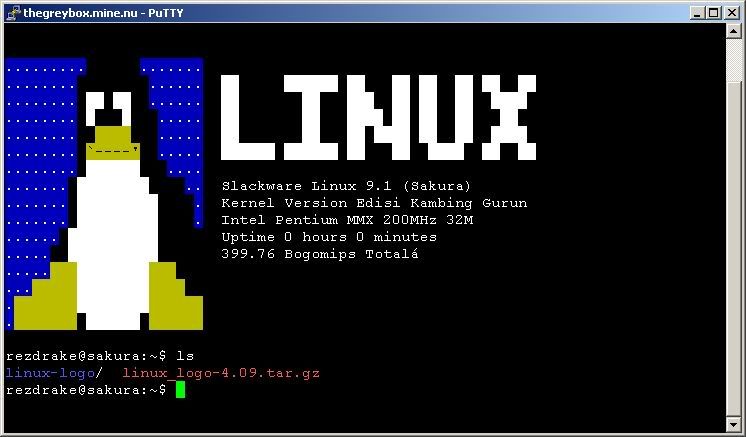
Play with linux_logo this morning . So i installed this on Sakura. Quick and Dirty Installing linux_logo untar and uncompress the file tar -xzvf linux_logo-4.08.tar.gz enter the directory cd linux_logo-4.08 edit the Makefile and be sure everything is set up the way you want. [on stock Linux systems it should work without any changes] compile the program make install (you'll probably want to do this as root) with make install I prefer the classic logo. so i'd set it so that the logo will display at the login screen
So... as root
root@sakura:/boot# pico /etc/rc.d/rc.M
I add this
/usr/local/bin/linux_logo -f -c -d -F"Slackware Linux 9.1 (Sakura)\nKernel Version Edisi Kambing Gurun\n#X #T #M #R\n#U\n#B Bogomips Total" > /etc/issue
/usr/local/bin/linux_logo -f -c -d -F"Slackware Linux 9.1 (Sakura)\nKernel Version Edisi Kambing Gurun\n#X #T #M #R\n#U\n#B Bogomips Total" > /etc/issue.net
/usr/local/bin/linux_logo -f -c -d -F"Slackware Linux 9.1 (Sakura)\nKernel Version Edisi Kambing Gurun\n#X #T #M #R\n#U\n#B Bogomips Total" > /etc/motd
So the result will look like this
thats all for now.. probably later will be experimenting with apache,php and setup and configuring squirrelmail.
not feeling well to day.. had flu not that bird flu.. need to get rest.. choww..
Oh yaa.. bought 2.5 HD enclosure.. unfortunately it didn't F$%#ing fit .Im a bit frustrated that day.. i didn't know that.. this HD doesn't fit in the casing.Id expect all the 2.5 HD comes in standard size.But then.. this 2.5 Toshiba HD which comes with the Laptop is a little bit old.. therefore.. the hardisk also a little f#$king big.So i just leave it naked without the case and used the leather pouch that comes together with the HDD case to cover the HD. felt sooo rugi.. adoii.But overall.. the cable was functioning well.
After finish my last test, i start configuring back my Pentium 200mhz Scsi HD(sakura).Which having problem with the new kernel that i've compiled.Damn.. it took so long to compile on this machine.After so many times of compiling this kernel.. ive come to understand that im the one who is acting like a fool.Ive been compiling the kernel with the wrong processor type.I was thinking this box is my AMD Athlon XP duhhhhh!!.. but then it just a pentium MMX box.Adooiiiii when ive just realised it.., i feel like i wanna bang my head to the wall.. stupid stupid.
So start recompiling the kernel back but this time with the correct processor type duhhhh!!
rezdrake@sakura:~$ cd /usr/src/linux
rezdrake@sakura:/usr/src/linux$ make menuconfig
set the processor type,remove unwanted modules(irda,USB support,bla bla),set 3com Network drivers 3c509.o to be builtin in the kernel
rezdrake@sakura:/usr/src/linux$ make dep
rezdrake@sakura:/usr/src/linux$ make clean
rezdrake@sakura:/usr/src/linux$ make bzImage
rezdrake@sakura:/usr/src/linux$ make modules
rezdrake@sakura:/usr/src/linux$ make modules_install
Move the compiled kernel to /boot
rezdrake@sakura:/usr/src/linux$ mv /arch/i386/boot/bzImage /boot
Copy the new System.map file to /boot
rezdrake@sakura:/usr/src/linux$ ls
COPYING Makefile System.map fs/ kernel/ scripts/
CREDITS README arch/ include/ lib/ vmlinux*
Documentation/ REPORTING-BUGS crypto/ init/ mm/
MAINTAINERS Rules.make drivers/ ipc/ net/
rezdrake@sakura:/usr/src/linux$ cp System.map /boot
Then enter /boot
rezdrake@sakura:/usr/src/linux$ cd /boot
Rename bzImage kernel to filename such as vmlinuz-2.4.22
rezdrake@sakura:/boot$mv bzImage vmlinuz-2.4.22
Edit lilo.conf to add a new kernel into the lilo menu.
root@sakura:/boot# pico /etc/lilo.conf
# Linux bootable partition config begins
image = /boot/vmlinuz-2.4.22 <--- add the new kernel root = /dev/sda2 label = Slackware-9.1 read-only # Non-UMSDOS filesystems should be mounted read-only for checking image = /boot/vmlinuz root = /dev/sda2 label = Slackware-old # Linux bootable partition config ends --------------------------------------------------------------------------------
Play with linux_logo this morning . So i installed this on Sakura. Quick and Dirty Installing linux_logo untar and uncompress the file tar -xzvf linux_logo-4.08.tar.gz enter the directory cd linux_logo-4.08 edit the Makefile and be sure everything is set up the way you want. [on stock Linux systems it should work without any changes] compile the program make install (you'll probably want to do this as root) with make install I prefer the classic logo. so i'd set it so that the logo will display at the login screen
So... as root
root@sakura:/boot# pico /etc/rc.d/rc.M
I add this
/usr/local/bin/linux_logo -f -c -d -F"Slackware Linux 9.1 (Sakura)\nKernel Version Edisi Kambing Gurun\n#X #T #M #R\n#U\n#B Bogomips Total" > /etc/issue
/usr/local/bin/linux_logo -f -c -d -F"Slackware Linux 9.1 (Sakura)\nKernel Version Edisi Kambing Gurun\n#X #T #M #R\n#U\n#B Bogomips Total" > /etc/issue.net
/usr/local/bin/linux_logo -f -c -d -F"Slackware Linux 9.1 (Sakura)\nKernel Version Edisi Kambing Gurun\n#X #T #M #R\n#U\n#B Bogomips Total" > /etc/motd
So the result will look like this
thats all for now.. probably later will be experimenting with apache,php and setup and configuring squirrelmail.
not feeling well to day.. had flu not that bird flu.. need to get rest.. choww..
Wednesday, February 11, 2004
My | Netmanwatch
myNetWatchman Perl Agent is a client for myNetWatchman.com. This program is designed to capture rejected packet information from various firewall logs and forward this attack information to central analysis servers at myNetWatchman.com, which then analyze events and escalate to the provider of the source.
http://www.mynetwatchman.com/
DNS tool, tutorial Finding addresses of computers around the Internet, Publishing addresses of your own computers,Under the hood: DNS problems
http://cr.yp.to/djbdns.html
Video For Linux Resources
http://www.exploits.org/v4l/
myNetWatchman Perl Agent is a client for myNetWatchman.com. This program is designed to capture rejected packet information from various firewall logs and forward this attack information to central analysis servers at myNetWatchman.com, which then analyze events and escalate to the provider of the source.
http://www.mynetwatchman.com/
DNS tool, tutorial Finding addresses of computers around the Internet, Publishing addresses of your own computers,Under the hood: DNS problems
http://cr.yp.to/djbdns.html
Video For Linux Resources
http://www.exploits.org/v4l/
Labels:
Linux
Tuesday, November 04, 2003
Whoaa found someone who still used this laptop. Yeahh like me <:=).Yeah.. i emailed him.. requesting for his config.Got his tutorial on how to install Slackware on this laptop thru NFS.I luv you laa member indon ku.
Halo,
ini informasi linux di Notebook saya :
- Toshiba 430CDT : Pentium 120, 32 M, 1.2 G, TFT - PCMCIA : 3Com 3c562 (LAN + Modem 33.6)
- Linux Slackware 3.5 - Kernel 2.0.35
- Card service : pcmcia-cs-3.0.5
instalasi di harddisk : - partisi windows saya ubah (fips) dari 1.2 menjadi 800 M (/dev/hda1) - bootdisk : net.i, rootdisk : pcmcia.gz (karena saya install menggunakan nfs) - partisi untuk linux : 32 M swap (/dev/hda2) dan 331+ M ext2fs (/dev/hda3) - install slackware developer + kernel source + xwindows - copy ke lokal patch kernel patch-2.0.35.gz (saya mau upgrade kernel ke 2.0.35) - copy ke lokal pcmcia-cs-3.0.5.gz (pcmcia support terbaru) - compile kernel <- sound support - lilo Sekarang sudah jalan, oh ya untuk file XF86Config-nya ada di ftp server
(seharusnya ini bisa juga untuk 425cds): ftp://ftp.wasantara.net.id/pub/linux/xf86Config.430cdt dan juga ada file ftp://ftp.wasantara.net.id/pub/linux/pcmcia-cs-3.0.5.gz ftp://ftp.wasantara.net.id/pub/linux/patch-2.0.35.gz
Saya sebelum ini juga sudah install tapi dengan slackware 3.4 tidak ada masalah, berikut KDE (ada di posting saya terdahulu). Hasilnya, SANGAT bagus, terutama untuk interface ke user si KDE baik sekali (di hp dia gambar Toshiba tuh :-) Sekarang belum di-install KDE (rencana sih sudah ada, KDE 1.0). Software yang sudah jalan : iptraf (lan monitoring, sangat baik untuk freeware saya rasa), siag (jauhlebih ringan daripada so, kemampuan maupun resource ;-), x11amp (bisa baca cd mp3 sekarang -> joliet format ;-), mtv
(sama, untuk baca vcd sudah langsung).
Yang pasti sih Notebook + Linux = kompak.
Oh ya,
PCMCIA diatur card service, jadi nggak langsung oleh kernel, dan untuk
pcmcia-cs-3.0.5 support sebagian Xircom card maupun Megahertz; ini dari
SUPPORTED.CARDS :
"...
[xirc2ps_cs driver]
Compaq Ethernet Adapter
Xircom CreditCard CE2 <- Ethernet
...
Xircom CreditCard CE3 <- Ethernet/FastEthernet
...
[netwave_cs driver]
Xircom CreditCard Netwave <- Wireless
...
[Virtually all modem cards,
simple serial port cards,
and digital cellular modems should work. ...
exceptions (KECUALI!) ...Megahertz XJ/EM2560... <- mudah-mudahan bukan
ini card Anda
...
[smc91c92_cs driver]
Megahertz/U.S. Robotics EM1144, EM3288, EM3336 <- multifunction card
...
[xirc2ps_cs driver]
Xircom CreditCard CEM28, CEM33, CEM56 <- multifunction card
..."
Rencananya di homepage mau ditambahi isinya dengan keterangan cara singkat
koneksi dengan Linux, belum sempat oey :-), sibuk nyari freeware atau "low
cost ware" untuk analyzer di Lan (seperti lanstat di FreeBSD), ada yang
bisa kasih informasi ? Di freshmeat ketemunya ya iptraf itu. Soalnya kalau
Sniffer dari NG bisa sampai 20 K (= 200 jut rp ) lebih ...
Sekian dulu ah, kepanjangan lagi nih ....
Terimakasih,
Labels:
Linux
Monday, October 20, 2003
Tecras and other notebooks : problems with bzImage kernels
Tip provided by Manoj Srivastava
(Many thanks to Philip Hands
Tecras and other notebooks, and some PCs have a problem where they
fail to flush the cache when switching on the a20 gate (IIRC), which
is provoked by bzImage kernels, but not by zimage kernels.
bzImage files are actually "big zImage" not "bzipped Image". bzImage
kernels can be as large as you like, but because they need to decompress
into extended memory, they aggravate this problem. zImage kernels just
compress into conventional memory, so they never need to touch the a20 gate,
but they hit the 640k limit.
This problem is *not* present in late 2.1.* and later (2.2 when
available) kernels, bzImage kernel work just fine (the necessary code
has been added, see the .S files in the kernel sources).
For older kernels there are two solutions that I know of:
1) apply a patch, which flushes the cache. Unfortunately this
causes other machines to crash so is not universally applicable
(hence the tecra disks being segragated from the mainstream)
2) build a zimage, rather than bzimage kernel. This seems to get
round the problem. use the --zimage option to make-kpkg, or even
set this as the default in /etc/kernel-pkg.conf.
Tip provided by Manoj Srivastava
(Many thanks to Philip Hands
and
Avery Pennarun (a p e n w a r r @ w o r l d v i s i o n s . c a) for this explanation)
Tecras and other notebooks, and some PCs have a problem where they
fail to flush the cache when switching on the a20 gate (IIRC), which
is provoked by bzImage kernels, but not by zimage kernels.
bzImage files are actually "big zImage" not "bzipped Image". bzImage
kernels can be as large as you like, but because they need to decompress
into extended memory, they aggravate this problem. zImage kernels just
compress into conventional memory, so they never need to touch the a20 gate,
but they hit the 640k limit.
This problem is *not* present in late 2.1.* and later (2.2 when
available) kernels, bzImage kernel work just fine (the necessary code
has been added, see the .S files in the kernel sources).
For older kernels there are two solutions that I know of:
1) apply a patch, which flushes the cache. Unfortunately this
causes other machines to crash so is not universally applicable
(hence the tecra disks being segragated from the mainstream)
2) build a zimage, rather than bzimage kernel. This seems to get
round the problem. use the --zimage option to make-kpkg, or even
set this as the default in /etc/kernel-pkg.conf.
Labels:
Linux
Tuesday, October 14, 2003
Read the newsforge today.Found new reports on 7 Opensource OS distribution which supports 64-bit Processor.So i posted here.
Seven open source OS distributions for 64-bit processors
Debian GNU/Linux -- All of Debian's free 3.0 and 3.0r1 distributions support IA 64 and SPARC architectures. Two more versions are currently in the testing stage.
FreeBSD -- The newest version, FreeBSD 5, supports the SPARC 64 and IA 64 architectures.
Mandrake -- Mandrake Linux 9.0 for AMD 64 was released last March. It includes a high-performance Web server, FTP server, extended security services, and databases. Pricing: Sold under a subscription basis, which includes the product, support and direct access to software updates. Two support options are available: "Standard" ($749 USD) is valid for five incidents within a one-year period, and the "Unlimited" ($1499 USD) is valid for unlimited incidents during a one-year period.
NetBSD -- NetBSD/alpha is a true 64-bit system that fully implements the LP64 architecture, using 64-bit pointers and 64-bit long integers (standard integers are still 32 bits) in a linear, 4 TB address space. NetBSD/alpha was the first free OS to run on Alpha and supports the largest number of Alpha system types of any free OS. Version 1.6.1 was released last April.
Red Hat -- Enterprise Linux AS ($2499 Premium Edition, x86, $1499 Standard Edition, x86) and Enterprise Linux WS ($299 Premium Edition, x86, $179 Standard Edition, x86). AS is designed for industrial-strength departmental and datacenter server deployments. WS is Red Hat's desktop/client partner for Enterprise Linux AS and Enterprise Linux ES. Red Hat's 64-bit MIPS Core Processor Toolkit has been available since August 2001. Red Hat for the new AMD 64 chips is due out in a few weeks.
SuSE -- SLES 7 for IBM zSeries is now available; beta and evaluation downloads are also available now. A boxed version of SuSE Enterprise Server for IBM for AMD 64 is also available, but only in Germany at the moment. Pricing: $598 (minimum 5 workstations). Here is a NewsForge review of SLES 8.0 for AMD 64 and a DevChannel review of SLES 8.0 for Itanium, both by Russell Pavlicek.
Turbolinux -- TurboLinux 8 for AMD 64 allows the use of existing x86 software infrastructure, enabling migration from 32-bit to 64-bit. Pricing: $99 with support (boxed); $69 without support (boxed).
Seven open source OS distributions for 64-bit processors
Debian GNU/Linux -- All of Debian's free 3.0 and 3.0r1 distributions support IA 64 and SPARC architectures. Two more versions are currently in the testing stage.
FreeBSD -- The newest version, FreeBSD 5, supports the SPARC 64 and IA 64 architectures.
Mandrake -- Mandrake Linux 9.0 for AMD 64 was released last March. It includes a high-performance Web server, FTP server, extended security services, and databases. Pricing: Sold under a subscription basis, which includes the product, support and direct access to software updates. Two support options are available: "Standard" ($749 USD) is valid for five incidents within a one-year period, and the "Unlimited" ($1499 USD) is valid for unlimited incidents during a one-year period.
NetBSD -- NetBSD/alpha is a true 64-bit system that fully implements the LP64 architecture, using 64-bit pointers and 64-bit long integers (standard integers are still 32 bits) in a linear, 4 TB address space. NetBSD/alpha was the first free OS to run on Alpha and supports the largest number of Alpha system types of any free OS. Version 1.6.1 was released last April.
Red Hat -- Enterprise Linux AS ($2499 Premium Edition, x86, $1499 Standard Edition, x86) and Enterprise Linux WS ($299 Premium Edition, x86, $179 Standard Edition, x86). AS is designed for industrial-strength departmental and datacenter server deployments. WS is Red Hat's desktop/client partner for Enterprise Linux AS and Enterprise Linux ES. Red Hat's 64-bit MIPS Core Processor Toolkit has been available since August 2001. Red Hat for the new AMD 64 chips is due out in a few weeks.
SuSE -- SLES 7 for IBM zSeries is now available; beta and evaluation downloads are also available now. A boxed version of SuSE Enterprise Server for IBM for AMD 64 is also available, but only in Germany at the moment. Pricing: $598 (minimum 5 workstations). Here is a NewsForge review of SLES 8.0 for AMD 64 and a DevChannel review of SLES 8.0 for Itanium, both by Russell Pavlicek.
Turbolinux -- TurboLinux 8 for AMD 64 allows the use of existing x86 software infrastructure, enabling migration from 32-bit to 64-bit. Pricing: $99 with support (boxed); $69 without support (boxed).
Labels:
Linux
Friday, October 10, 2003
Slackware 9.1 Download Completed, Burn Baby Burn!
Yeah, finally all the Slackware 9.1 ISO had been downloaded. It took me a week to completely download all the 4 CDs 'sigh'. Why..? because my mom always switch off the main switch when im not at home or went to college.She thought i forgot to switch off the PC.Huh!! i don't know what to say :(. Felt sad when im came home, all i saw was a quiet PC with no Green Light and Red Blinking Hardisk which indicates the PC were turned off and :(. Sometimes i would turn off the Monitor so that she will think that i already switched off the PC.Yet,all my mom knows is, if the main swith is still on,then she will turn it off straight away. Arghhhh what to do what to do.. perhaps i should lock this room when im going out lol.
So last night after having a drink in town with Helix, i went back and burned Slackware 9.1 ISO onto CD. I only burned the first 2 CDs (CD1 and CD2) since the other 2 CDs only contain the Source. So for those who don't know how to burn an ISO files onto the CD, here i wrote a simple step or guide or instructions or whatever you want to call it on how to burn an ISO file.
So since im using a Nero CD Burning Software therefore this guide will only be focusing on how to Burn an ISO file using the software. So without futher adoo, Lets start
BURNING ISO USING NERO - HOWTO
- Firstly make sure the Nero burning Software had been installed.
- I assume the you already installed the software. So start the Nero software.
- Normally, once you start Nero, Nero should display a wizard.We will not be using Wizard. So choose cancel
- Then, from the menu command, Choose "FILE"--->"BURN IMAGE"
- An "Open" file dialog box appears with the following image types supported (*.nrg, *.iso, *.cue)
- From here, you can browse the ISO file which you are planning to burn. Choose the file and click open.
- By now the "Write CD" dialog box should appear with several tabs (Info, Foreign image, Misc, Burn).
- Click the 'BURN' tab and make sure that 'Write' and 'Finalize' are selected
- Then click 'Write' and watch it burn. Yeahh Baby :)
Reference :
Burn an ISO with Nero
http://linuxiso.org/viewdoc.php/neroburning.html
Thats all for now. Need to watch Survivor :) . au revoir
Yeah, finally all the Slackware 9.1 ISO had been downloaded. It took me a week to completely download all the 4 CDs 'sigh'. Why..? because my mom always switch off the main switch when im not at home or went to college.She thought i forgot to switch off the PC.Huh!! i don't know what to say :(. Felt sad when im came home, all i saw was a quiet PC with no Green Light and Red Blinking Hardisk which indicates the PC were turned off and :(. Sometimes i would turn off the Monitor so that she will think that i already switched off the PC.Yet,all my mom knows is, if the main swith is still on,then she will turn it off straight away. Arghhhh what to do what to do.. perhaps i should lock this room when im going out lol.
So last night after having a drink in town with Helix, i went back and burned Slackware 9.1 ISO onto CD. I only burned the first 2 CDs (CD1 and CD2) since the other 2 CDs only contain the Source. So for those who don't know how to burn an ISO files onto the CD, here i wrote a simple step or guide or instructions or whatever you want to call it on how to burn an ISO file.
So since im using a Nero CD Burning Software therefore this guide will only be focusing on how to Burn an ISO file using the software. So without futher adoo, Lets start
BURNING ISO USING NERO - HOWTO
- Firstly make sure the Nero burning Software had been installed.
- I assume the you already installed the software. So start the Nero software.
- Normally, once you start Nero, Nero should display a wizard.We will not be using Wizard. So choose cancel
- Then, from the menu command, Choose "FILE"--->"BURN IMAGE"
- An "Open" file dialog box appears with the following image types supported (*.nrg, *.iso, *.cue)
- From here, you can browse the ISO file which you are planning to burn. Choose the file and click open.
- By now the "Write CD" dialog box should appear with several tabs (Info, Foreign image, Misc, Burn).
- Click the 'BURN' tab and make sure that 'Write' and 'Finalize' are selected
- Then click 'Write' and watch it burn. Yeahh Baby :)
Reference :
Burn an ISO with Nero
http://linuxiso.org/viewdoc.php/neroburning.html
Thats all for now. Need to watch Survivor :) . au revoir
Saturday, August 02, 2003
Linux on a Toshiba Satellite Pro 430 CDT
Freakazoid's Toshiba Satellite useful links http://www.freakazoid.org/reference/tosh/
Linux on 430 CDT Config http://www.geocities.com/Silico...
Linux on Laptops http://www.linux-laptop.net/
Configuring Pikachu http://www.tux.org/~tbr/pc-config...
Configuring Gizmo 430CDT http://infonomade.linuxfr.org/portables...gizmo
Freakazoid's Toshiba Satellite useful links http://www.freakazoid.org/reference/tosh/
Linux on 430 CDT Config http://www.geocities.com/Silico...
Linux on Laptops http://www.linux-laptop.net/
Configuring Pikachu http://www.tux.org/~tbr/pc-config...
Configuring Gizmo 430CDT http://infonomade.linuxfr.org/portables...gizmo
Labels:
Linux
Friday, August 01, 2003
**Note**
To Backup Boot Sector
use "infile" (if) to backup the boot sector
To Hardisk
# dd if=/dev/hda of=bootsector.img bs=512 count=1
To Floppy :
# dd if=/dev/hda of=/dev/fd0 bs=512 count=1
To Restore these images, use "outfile" (of) destinations.
For example:
Restore from Hardisk:
# dd if=bootsector.img of=/dev/hda
If it's stored on a floppy, use :
# dd if=/dev/fd0 of=/dev/hda
To Backup Boot Sector
use "infile" (if) to backup the boot sector
To Hardisk
# dd if=/dev/hda of=bootsector.img bs=512 count=1
To Floppy :
# dd if=/dev/hda of=/dev/fd0 bs=512 count=1
To Restore these images, use "outfile" (of) destinations.
For example:
Restore from Hardisk:
# dd if=bootsector.img of=/dev/hda
If it's stored on a floppy, use :
# dd if=/dev/fd0 of=/dev/hda
Labels:
Linux
Tuesday, April 08, 2003
Toshiba 430CDT owners in Contact :)
Decided to send email to the user once i saw the user on linux laptop groups.. he also owned the same laptop model like mine and sucessfully install linux :)
On Tuesday 08 April 2003 08:48, you wrote:
> Hi, My name is Rezal. Im from Malaysia. The reason i
> mailed you this mail.. is to ask you regarding to your
> article Configuring Pikachu dated Friday, November
> 12, 1999.
> For your information.. ive also owned this model.. and
> ive been thinking of installing Linux on this machine.
> But im having trouble installing it because my floppy
> drive had problem reading the disk. So now i can't
> boot the linux boot disk in order for me to run linux
> installation. And also .. as you know this model
> cannot be boot thru CD.. just Floppy--> HD or
> HD-->Floppy.
> So i would to ask you.., if there is a way to install
> it. and is it possible to run Redhat 6.2 as i only
> have 16meg on that machine. I havent upgrade anything
> on that machine.
This is his reply :)
Hello Rezal,
Looking over the dates of the four documents, I gather you're talking
about Configuring a Toshiba Satellite Pro 430CDT, using Mandrake 6.0.
I'll try to help, but it's been a long time since I owned that
machine; I traded it for the Toshiba Portégé 320CT.
Also, I haven't run Mandrake or Red Hat in years; I use Debian almost
exclusively these days. But some things are universal.
> But im having trouble installing it because my floppy
> drive had problem reading the disk. So now i can't
> boot the linux boot disk in order for me to run linux
> installation. And also .. as you know this model
> cannot be boot thru CD.. just Floppy--> HD or
> HD-->Floppy.
Boot floppies are very sensitive to flaws in the media or formatting.
It's rare that a floppy drive actually goes bad itself; it's almost
always the diskette. Try making another boot floppy on a fresh
diskette.
> So i would to ask you.., if there is a way to install
> it. and is it possible to run Redhat 6.2 as i only
> have 16meg on that machine. I havent upgrade anything
> on that machine.
If you get a good boot floppy, I'd say you're in business. I don't
know about Red Hat (I think the latest REd Hat is version 9) or
Mandrake, but Debian you can install directly from the net. I do it
all the time, even with a modem.
16 Meg isn't a lot of RAM these days. A console based GNU/Linux
should work fine, but if you want to run stuff like X or KDE, it will
swap like mad and run very slowly. My notes indicate that the
Satellite Pro 430CDT can hold 48M RAM; I'd find some more RAM.
Also the Processor is a Pentium 120MHz. The newer KDE will seem
sluggish. However, your older Red Hat 6.2 might be just the thing!
Use a lighter window manager, not KDE or GNOME.
Certainly worth a try.
Make a fresh floppy (you may need to try several times) and let me
know if you get it working!
Good luck,
Ted Ruegsegger
Decided to send email to the user once i saw the user on linux laptop groups.. he also owned the same laptop model like mine and sucessfully install linux :)
On Tuesday 08 April 2003 08:48, you wrote:
> Hi, My name is Rezal. Im from Malaysia. The reason i
> mailed you this mail.. is to ask you regarding to your
> article Configuring Pikachu dated Friday, November
> 12, 1999.
> For your information.. ive also owned this model.. and
> ive been thinking of installing Linux on this machine.
> But im having trouble installing it because my floppy
> drive had problem reading the disk. So now i can't
> boot the linux boot disk in order for me to run linux
> installation. And also .. as you know this model
> cannot be boot thru CD.. just Floppy--> HD or
> HD-->Floppy.
> So i would to ask you.., if there is a way to install
> it. and is it possible to run Redhat 6.2 as i only
> have 16meg on that machine. I havent upgrade anything
> on that machine.
This is his reply :)
Hello Rezal,
Looking over the dates of the four documents, I gather you're talking
about Configuring a Toshiba Satellite Pro 430CDT, using Mandrake 6.0.
I'll try to help, but it's been a long time since I owned that
machine; I traded it for the Toshiba Portégé 320CT.
Also, I haven't run Mandrake or Red Hat in years; I use Debian almost
exclusively these days. But some things are universal.
> But im having trouble installing it because my floppy
> drive had problem reading the disk. So now i can't
> boot the linux boot disk in order for me to run linux
> installation. And also .. as you know this model
> cannot be boot thru CD.. just Floppy--> HD or
> HD-->Floppy.
Boot floppies are very sensitive to flaws in the media or formatting.
It's rare that a floppy drive actually goes bad itself; it's almost
always the diskette. Try making another boot floppy on a fresh
diskette.
> So i would to ask you.., if there is a way to install
> it. and is it possible to run Redhat 6.2 as i only
> have 16meg on that machine. I havent upgrade anything
> on that machine.
If you get a good boot floppy, I'd say you're in business. I don't
know about Red Hat (I think the latest REd Hat is version 9) or
Mandrake, but Debian you can install directly from the net. I do it
all the time, even with a modem.
16 Meg isn't a lot of RAM these days. A console based GNU/Linux
should work fine, but if you want to run stuff like X or KDE, it will
swap like mad and run very slowly. My notes indicate that the
Satellite Pro 430CDT can hold 48M RAM; I'd find some more RAM.
Also the Processor is a Pentium 120MHz. The newer KDE will seem
sluggish. However, your older Red Hat 6.2 might be just the thing!
Use a lighter window manager, not KDE or GNOME.
Certainly worth a try.
Make a fresh floppy (you may need to try several times) and let me
know if you get it working!
Good luck,
Ted Ruegsegger
Monday, December 16, 2002
Lilo and Stich
Assalamualaikum warahmatullah,
Last night .. format my Win98se on my "Scarletdiva". Install back Win98se from scratch and not with GHOST. its been a year already i haven't format my WIn98. Downloaded the latest driver for my Mobo Gigabyte GA-5AX rev.5 ALi chipset Socket 7 at the ALi Chipset manufacturer site which is now using an Intergrated driver version 1.091. Looks cool and simple to setup.. no need for me to Install AGP driver, IDE driver, sound.. ALL IN ONE. Lots of software i haven't install yet, just the standard software.
Got problem with LILO plak, My lilo ilang .. lilo aku which is reside in MBR had been erased because aku format C: drive aku which had lilo reside on it. Gabra.. aku.. Relak relak..
-So i used Redhat CD1 , change the boot sequence in BIOS to start boot up with CD
- Then at the boot prompt aku type Linux rescue
Boot:Linux rescue
- once im in da console aku check what partition dah mount .. by typing
blah# mount
- Then aku make a temporary directory to mount root partition aku
blah# mkdir hampeh
- Aku mount root partition aku which is at /dev/hda5
blah# mount /dev/hda5 /hampeh
- Then aku run lilo dari situ
blah# /sbin/lilo -r /hampeh
skali ouput kluar daaaa lebih kurang macam nie
Added windows*
Added Linux Redhat*
pehtu dgn bangga nyer aku menunaikan sahur pertama aku.. dgn nasi tomato yang my mom buat waktu berbuka tuh. hehe
Maelzx, hang kat mana ..? TMNET tak bley connect? .. aku rasa pasal tempat tuh. Regarding to ATI Radeon 9500 Pro Vs Nvidia Geforce 4 TI 4600 .. kena tengok gak .. kengkadang website tuh buat promote on certain product.. biasala kan.. normally kalau site-site review nie.. memang banyak mempengaruhi.. kita. Bagi aku ATI Radeon 9500 still the best in terms of graphic dia. But dari segi support aku tak sure sgt. Kalau Nvidia nie.. driver support berlambak .. bertambun( sharul suka guna ayat nie) even driver Nvidia banyak up to date from time to time. Deyy.. Keyboard tu beli jaa laa bukan mahal pun.. sedih aku tengok ko nak tekan A tak terkuar kuar. Dulu pernah jadi macam ko masa zaman jahiliyah aku.. keyboard aku bila tekan N kuar R bila tekan A kuar S .. sampai aku kena bukak cube cube tu tukar tempat. Lepas tu beli keyboard baru.. dekat sebulan kena rehab .. balik.. seksa seksa.. :)
haii mana pi brader sharul kita nie.. confirm raya sakan nie..
Assalamualaikum warahmatullah,
Last night .. format my Win98se on my "Scarletdiva". Install back Win98se from scratch and not with GHOST. its been a year already i haven't format my WIn98. Downloaded the latest driver for my Mobo Gigabyte GA-5AX rev.5 ALi chipset Socket 7 at the ALi Chipset manufacturer site which is now using an Intergrated driver version 1.091. Looks cool and simple to setup.. no need for me to Install AGP driver, IDE driver, sound.. ALL IN ONE. Lots of software i haven't install yet, just the standard software.
Got problem with LILO plak, My lilo ilang .. lilo aku which is reside in MBR had been erased because aku format C: drive aku which had lilo reside on it. Gabra.. aku.. Relak relak..
-So i used Redhat CD1 , change the boot sequence in BIOS to start boot up with CD
- Then at the boot prompt aku type Linux rescue
Boot:Linux rescue
- once im in da console aku check what partition dah mount .. by typing
blah# mount
- Then aku make a temporary directory to mount root partition aku
blah# mkdir hampeh
- Aku mount root partition aku which is at /dev/hda5
blah# mount /dev/hda5 /hampeh
- Then aku run lilo dari situ
blah# /sbin/lilo -r /hampeh
skali ouput kluar daaaa lebih kurang macam nie
Added windows*
Added Linux Redhat*
pehtu dgn bangga nyer aku menunaikan sahur pertama aku.. dgn nasi tomato yang my mom buat waktu berbuka tuh. hehe
Maelzx, hang kat mana ..? TMNET tak bley connect? .. aku rasa pasal tempat tuh. Regarding to ATI Radeon 9500 Pro Vs Nvidia Geforce 4 TI 4600 .. kena tengok gak .. kengkadang website tuh buat promote on certain product.. biasala kan.. normally kalau site-site review nie.. memang banyak mempengaruhi.. kita. Bagi aku ATI Radeon 9500 still the best in terms of graphic dia. But dari segi support aku tak sure sgt. Kalau Nvidia nie.. driver support berlambak .. bertambun( sharul suka guna ayat nie) even driver Nvidia banyak up to date from time to time. Deyy.. Keyboard tu beli jaa laa bukan mahal pun.. sedih aku tengok ko nak tekan A tak terkuar kuar. Dulu pernah jadi macam ko masa zaman jahiliyah aku.. keyboard aku bila tekan N kuar R bila tekan A kuar S .. sampai aku kena bukak cube cube tu tukar tempat. Lepas tu beli keyboard baru.. dekat sebulan kena rehab .. balik.. seksa seksa.. :)
haii mana pi brader sharul kita nie.. confirm raya sakan nie..
Labels:
Linux